Activate KQED Passport
Watch the brief video below for a step-by-step guide to downloading the PBS App and activating your Passport member benefit to start streaming.
Steps to Activate
Step 1: Get Your Code
Check your inbox for a PBS email with your activation link, or click Look Up My Passport Activation Code / Check Status using your membership email.
Step 2: Activate & Sign In
Sign in with your PBS account or enter your activation code at pbs.org/activate.
Step 3: Download & Watch
Install the PBS App on your Smart TV, Roku, Apple TV, or mobile, open it, and follow the setup instructions. Pair your device at pbs.org/tv or scan the QR code to start streaming.

Need Help or Don’t Have Passport Yet?
Not a Member Yet?
KQED Passport is available to members donating $96/year or $8/month
Become a Member
Having Technical Issues?
For all technical issues, please visit PBS Help and submit a ticket, or call 415-942-8804.
Visit PBS Help
KQED Membership and Eligibility FAQs
Who can access KQED Passport?
KQED Passport is an added benefit available to members donating $96/year or more. If you have questions as to your donation or eligibility for this benefit, please contact Member Services. You can also visit pbs.org/passport/lookup/ and see if you already have access.
Do I have to activate KQED Passport if I don’t want to?
No. It is up to you to decide whether or not to activate KQED Passport. You can still watch plenty of videos on your computer, smartphone and tablet without it. KQED Passport offers station donors extended on-demand access to a rich library of quality public television programming.
If I do not have KQED Passport, will I still be able to watch programs on PBS.org and KQED.org for free?
Yes. Free is not going away. Many of our programs are available for free on various digital platforms including PBS.org, our mobile applications and the PBS channels on Roku, AppleTV and other streaming services. And of course, PBS programs will continue to be broadcast to the public, for free, over the air.
Activation and Streaming Devices FAQs
How do I use Passport with a Roku Device, Apple TV, Amazon Fire TV or Android Smart TV?
Do I need any special devices to use KQED Passport?
No. You can view Passport videos on your computer, smartphone and tablet. It is also available via the PBS App for iOS, Android, Apple TV, Roku, Chromecast and other streaming devices. We will expand access to additional devices and platforms over time.
Programming and Regional Access FAQs
What programs are available in KQED Passport?
Programs available on Passport span a wide range of topics and series from PBS, KQED and MASTERPIECE. You can view all shows available on Passport here.
How can I find KQED Passport content?
After activating your KQED Passport account, you can view KQED Passport content on your computer, iPhone and iPad, as well as on the PBS channel on Apple TV. All KQED Passport content is designated by a Passport icon.

All videos displaying that icon are available to KQED Passport members only.
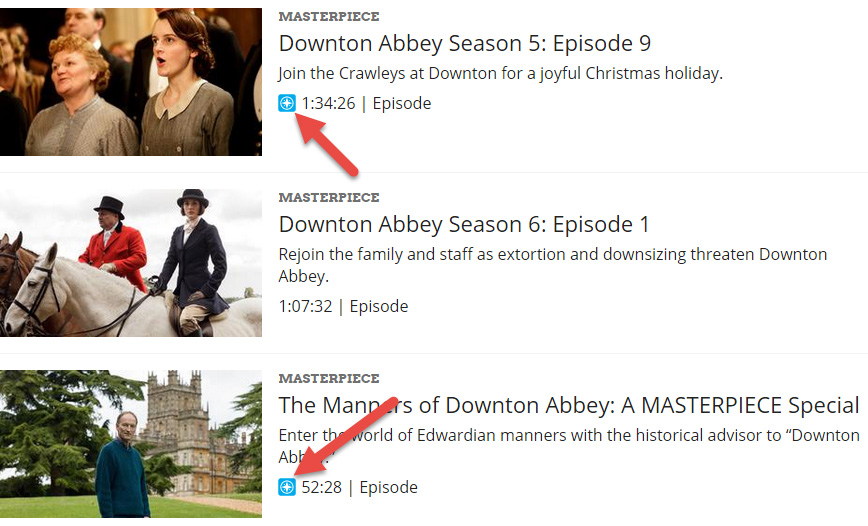
I can’t find my favorite PBS show in KQED Passport. Why not?
The library of content will continue to grow and change over time as more titles are added — so please keep checking back.
Is KQED Passport available outside the U.S.?
All PBS streaming video — KQED Passport included — is only available within the United States.
What is KQED Passport?
KQED Passport is a member benefit that gives eligible donors and supporters extended access to an on-demand library of quality public television programming online.
The KQED Passport library currently offers members more than 2,000 episodes to watch, with new PBS and KQED programs being added weekly. The library features episodes from popular programs like American Experience, American Masters, Antiques Roadshow, Nature, NOVA, and MASTERPIECE — including all five seasons of Downton Abbey. In addition to these signature series, the library is full of public television’s acclaimed arts, science, history and lifestyle programs; including How We Got to Now, Earth a New Wild, Austin City Limits and a rotating selection of films from Ken Burns.
Get More Passport Help
Not finding what you’re looking for? Let us help you.
Monday–Friday, 9 a.m.–4:45 p.m.
More Membership Benefits
Pledge-Free Stream
Sustaining members who give $5 or more each month get access to our Pledge-Free Stream of KQED Public Radio during our radio fundraising drives.
Member Events
We invite our KQED Members to periodic free or discounted cultural events in the Bay Area.
On KQED Magazine
Read our monthly member magazine On KQED.